CodeIgniter4: View Layouting and Custom 404 Page for Portfolio Project
Published:
Efficient page management is an important aspect of web application development, especially to keep the UI structure organized and maintainable in the long term. In this article, we practice page layouting using a static portfolio website case study and 404 customization.
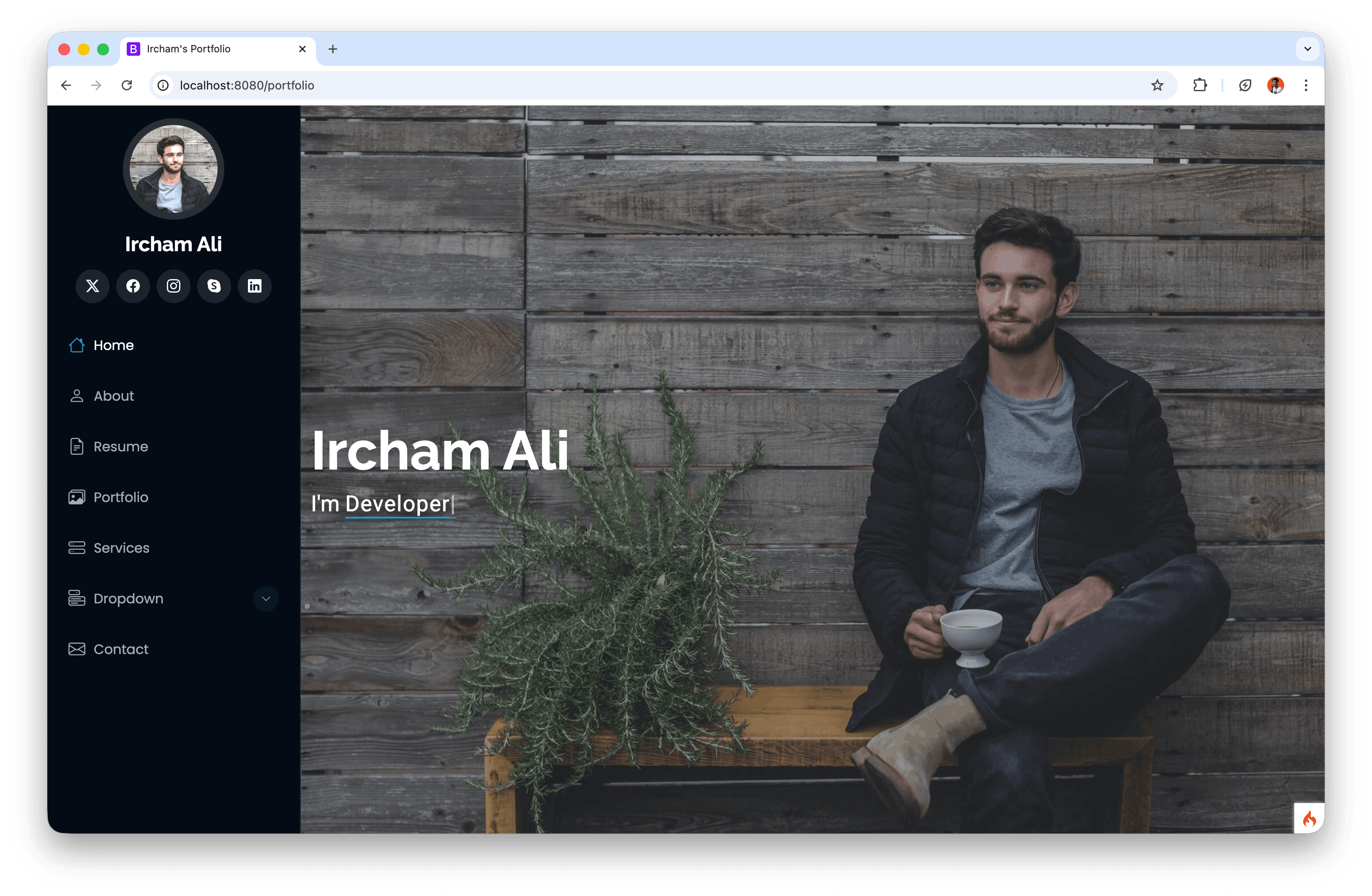
The layout template used in this practice is iPortfolio from BootstrapMade. The main focus is splitting views into reusable parts (template, header, footer) and rendering the main content in v_portfolio. This approach makes pages more structured, easier to maintain, and easier to scale into multi-page implementations. As a complement, the 404 Page Not Found is also customized so the user experience remains consistent with the portfolio branding.
1. Preparing iPortfolio Template Assets
Start from an existing CI4 project, then prepare iPortfolio assets inside the public directory.
General steps:
- Download the iPortfolio template from BootstrapMade.
- Copy the
assetsfolder and paste it intopublic/. - Make sure core files such as CSS and JS are accessible in the browser.
Example CSS asset call in HTML:
<link href="<?= base_url('assets/css/main.css'); ?>" rel="stylesheet">
Example JS asset call in HTML:
<script src="<?= base_url('assets/js/main.js'); ?>"></script>
2. Layout Structure in Views Folder
Create the following view structure to keep the layout modular:
app/Views/
  v_portfolio.php
  layouts/
    template.php
    header.php
    footer.php
Fill app/Views/layouts/template.php with the following code:
<?= $this->include('layouts/header'); ?>
<?= $this->renderSection('content'); ?>
<?= $this->include('layouts/footer'); ?>
These three files have separate responsibilities:
header.php: opening HTML tags, meta tags, CSS, sidebar/menu.template.php: main frame to inject the content section.footer.php: closing layout and JS scripts.
3. Filling Header and Footer
Header code example in app/Views/layouts/header.php:
<!DOCTYPE html>
<html lang="en">

<head>
  <meta charset="utf-8">
  <meta content="width=device-width, initial-scale=1.0" name="viewport">
  <title><?= esc($title ?? 'Portfolio') ?></title>
  <meta content="" name="description">
  <meta content="" name="keywords">

  <!-- Favicons -->
  <link href="<?= base_url('assets/img/favicon.png'); ?>" rel="icon">
  <link href="<?= base_url('assets/img/apple-touch-icon.png'); ?>" rel="apple-touch-icon">

  <!-- Fonts -->
  <link href="https://fonts.googleapis.com" rel="preconnect">
  <link href="https://fonts.gstatic.com" rel="preconnect" crossorigin>
  <link href="https://fonts.googleapis.com/css2?family=Roboto:ital,wght@0,100;0,300;0,400;0,500;0,700;0,900;1,100;1,300;1,400;1,500;1,700;1,900&family=Poppins:ital,wght@0,100;0,200;0,300;0,400;0,500;0,600;0,700;0,800;0,900;1,100;1,200;1,300;1,400;1,500;1,600;1,700;1,800;1,900&family=Raleway:ital,wght@0,100;0,200;0,300;0,400;0,500;0,600;0,700;0,800;0,900;1,100;1,200;1,300;1,400;1,500;1,600;1,700;1,800;1,900&display=swap" rel="stylesheet">

  <!-- Vendor CSS Files -->
  <link href="<?= base_url('assets/vendor/bootstrap/css/bootstrap.min.css'); ?>" rel="stylesheet">
  <link href="<?= base_url('assets/vendor/bootstrap-icons/bootstrap-icons.css'); ?>" rel="stylesheet">
  <link href="<?= base_url('assets/vendor/aos/aos.css'); ?>" rel="stylesheet">
  <link href="<?= base_url('assets/vendor/glightbox/css/glightbox.min.css'); ?>" rel="stylesheet">
  <link href="<?= base_url('assets/vendor/swiper/swiper-bundle.min.css'); ?>" rel="stylesheet">

  <!-- Main CSS File -->
  <link href="<?= base_url('assets/css/main.css'); ?>" rel="stylesheet">

  <!-- =======================================================
  * Template Source: https://bootstrapmade.com/iportfolio-bootstrap-portfolio-websites-template/
  ======================================================== -->
</head>

<body class="index-page">

  <header id="header" class="header dark-background d-flex flex-column">
    <i class="header-toggle d-xl-none bi bi-list"></i>

    <div class="profile-img">
      <img src="<?= base_url('assets/img/my-profile-img.jpg'); ?>" alt="" class="img-fluid rounded-circle">
    </div>

    <a href="<?= base_url('/portfolio'); ?>" class="logo d-flex align-items-center justify-content-center">
      <h1 class="sitename"><?= $name; ?></h1>
    </a>

    <nav id="navmenu" class="navmenu">
      <ul>
        <li><a href="#hero" class="active"><i class="bi bi-house navicon"></i>Home</a></li>
        <li><a href="#about"><i class="bi bi-person navicon"></i> About</a></li>
        <li><a href="#resume"><i class="bi bi-file-earmark-text navicon"></i> Resume</a></li>
        <li><a href="#portfolio"><i class="bi bi-images navicon"></i> Portfolio</a></li>
        <li><a href="#services"><i class="bi bi-hdd-stack navicon"></i> Services</a></li>
        <li><a href="#contact"><i class="bi bi-envelope navicon"></i> Contact</a></li>
      </ul>
    </nav>

  </header>
Footer code example in app/Views/layouts/footer.php:
<footer id="footer" class="footer position-relative light-background">
<div class="container">
<div class="copyright text-center ">
<p>© <?= date('Y'); ?> Portfolio <?= $name; ?></p>
</div>
</div>
</footer>
<!-- Scroll Top -->
<a href="#" id="scroll-top" class="scroll-top d-flex align-items-center justify-content-center"><i class="bi bi-arrow-up-short"></i></a>
<!-- Preloader -->
<div id="preloader"></div>
<!-- Vendor JS Files -->
<script src="<?= base_url('assets/vendor/bootstrap/js/bootstrap.bundle.min.js'); ?>"></script>
<script src="<?= base_url('assets/vendor/php-email-form/validate.js'); ?>"></script>
<script src="<?= base_url('assets/vendor/aos/aos.js'); ?>"></script>
<script src="<?= base_url('assets/vendor/typed.js/typed.umd.js'); ?>"></script>
<script src="<?= base_url('assets/vendor/purecounter/purecounter_vanilla.js'); ?>"></script>
<script src="<?= base_url('assets/vendor/waypoints/noframework.waypoints.js'); ?>"></script>
<script src="<?= base_url('assets/vendor/glightbox/js/glightbox.min.js'); ?>"></script>
<script src="<?= base_url('assets/vendor/imagesloaded/imagesloaded.pkgd.min.js'); ?>"></script>
<script src="<?= base_url('assets/vendor/isotope-layout/isotope.pkgd.min.js'); ?>"></script>
<script src="<?= base_url('assets/vendor/swiper/swiper-bundle.min.js'); ?>"></script>
<!-- Main JS File -->
<script src="<?= base_url('assets/js/main.js'); ?>"></script>
</body>
</html>
4. Building Main View v_portfolio
Now fill app/Views/v_portfolio.php using the extend-section pattern.
<?= $this->extend('layouts/template'); ?>
<?= $this->section('content'); ?>
<main class="main">
<!-- Hero Section -->
<section id="hero" class="hero section dark-background">
<img src="<?= base_url('assets/img/hero-bg.jpg'); ?>" alt="" data-aos="fade-in" class="">
<div class="container" data-aos="fade-up" data-aos-delay="100">
<h2><?= $name; ?></h2>
<p>I'm <span class="typed" data-typed-items="Designer, Developer, Freelancer, Photographer">Designer</span><span class="typed-cursor typed-cursor--blink" aria-hidden="true"></span><span class="typed-cursor typed-cursor--blink" aria-hidden="true"></span></p>
</div>
</section>
<!-- /Hero Section -->
<!-- About Section -->
<section id="about" class="about section">
<!-- Section Title -->
<div class="container section-title" data-aos="fade-up">
<h2>About</h2>
<p>Magnam dolores commodi suscipit. </p>
</div>
<!-- End Section Title -->
<div class="container" data-aos="fade-up" data-aos-delay="100">
<div class="row gy-4 justify-content-center">
<div class="col-lg-4">
<img src="<?= base_url('assets/img/my-profile-img.jpg'); ?>" class="img-fluid" alt="">
</div>
<div class="col-lg-8 content">
<h2>UI/UX Designer & Web Developer.</h2>
<p class="fst-italic py-3">
Lorem ipsum dolor sit amet, consectetur adipiscing elit, sed do eiusmod tempor incididunt ut labore et dolore
magna aliqua.
</p>
<div class="row">
<div class="col-lg-6">
<ul>
<li><i class="bi bi-chevron-right"></i> <strong>Birthday:</strong> <span>1 May 1995</span></li>
<li><i class="bi bi-chevron-right"></i> <strong>Website:</strong> <span>www.example.com</span></li>
<li><i class="bi bi-chevron-right"></i> <strong>Phone:</strong> <span>+123 456 7890</span></li>
<li><i class="bi bi-chevron-right"></i> <strong>City:</strong> <span>Jakarta, Indonesia</span></li>
</ul>
</div>
<div class="col-lg-6">
<ul>
<li><i class="bi bi-chevron-right"></i> <strong>Age:</strong> <span>30</span></li>
<li><i class="bi bi-chevron-right"></i> <strong>Degree:</strong> <span>Master</span></li>
<li><i class="bi bi-chevron-right"></i> <strong>Email:</strong> <span>email@example.com</span></li>
<li><i class="bi bi-chevron-right"></i> <strong>Freelance:</strong> <span>Available</span></li>
</ul>
</div>
</div>
<p class="py-3">
Officiis eligendi itaque labore et dolorum mollitia officiis optio vero.
</p>
</div>
</div>
</div>
</section>
<!-- /About Section -->
<?= $this->endSection(); ?>
Notes:
- Section IDs such as
hero,about,resume,portfolio,contactalign with iPortfolio structure. - You do not need to move the full
index.htmlcontent all at once. Start from core sections, then continue gradually.
5. Controller and Route for Portfolio Page
Simple example in app/Controllers/Home.php:
public function index()
{
  return view('v_portfolio', [
    'title' => 'CI4 Portfolio',
    'name' => 'Ircham Ali',
  ]);
}
Add routes in app/Config/Routes.php:
$routes->get('/', 'Home::index');
$routes->get('/portfolio', 'Home::index');
6. Customizing the 404 Page
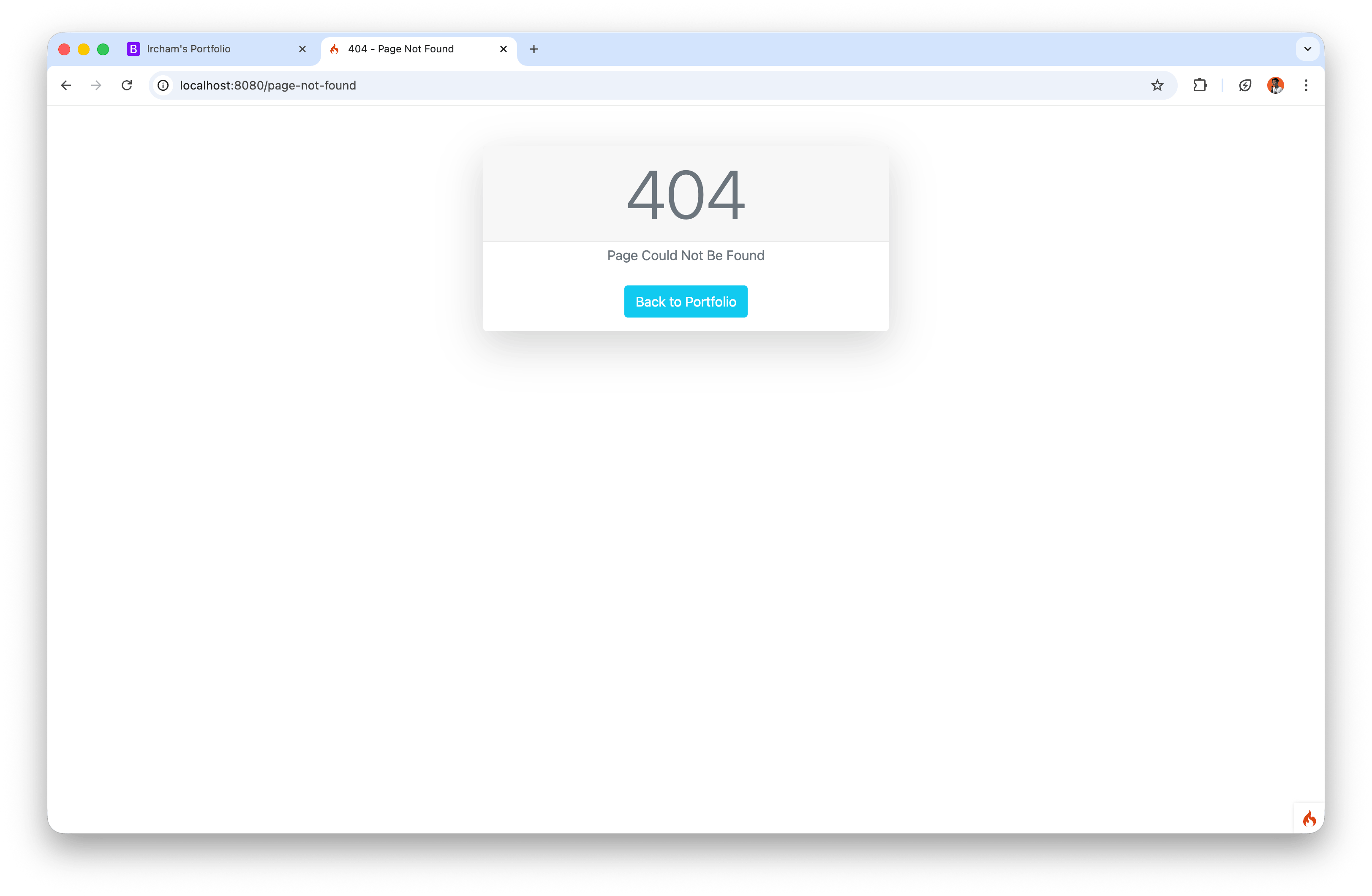
By default, 404 output is different in development and production. To keep it consistent with the portfolio theme, create a custom page in:
app/Views/errors/not_found.php
Simple content example:
<!doctype html>
<html lang="en">
<head>
  <meta charset="utf-8">
  <meta name="viewport" content="width=device-width, initial-scale=1">
  <title>404 - Page Not Found</title>
  <link href="https://cdn.jsdelivr.net/npm/bootstrap@5.1.3/dist/css/bootstrap.min.css" rel="stylesheet">
</head>
<body class="bg-light">
  <div class="container py-5">
    <div class="card shadow mx-auto" style="max-width: 36rem;">
      <h3 class="card-header text-center display-1 text-muted">404</h3>
      <div class="card-body text-center">
        <p class="text-muted mb-4">Sorry, the page you are looking for is not available.</p>
        <a href="<?= base_url('/portfolio'); ?>" class="btn btn-dark">Back to Portfolio</a>
      </div>
    </div>
  </div>
</body>
</html>
Enable override in app/Config/Routes.php:
$routes->set404Override(function () {
  echo view('errors/not_found');
});
7. Testing Checklist
Run the following checks:
/portfolioshows the main iPortfolio section structure.- CSS/JS assets load without path errors.
- Menu navigation scrolls to the correct sections.
- Random URL (for example
/page-not-found) displays the custom 404 page.
8. Summary
This practice shows that CI4 layouting can be integrated directly with a popular static template like iPortfolio through a modular approach.
Key points:
v_portfolioholds the main page content.- The
layoutsfolder contains three core files:template.php,header.php, andfooter.php. - The 404 page can be customized to match portfolio branding.
With this pattern, you can move to the next stage: splitting sections into smaller partials, adding dynamic data from database, and building detail pages for each portfolio item.