CodeIgniter4: Initial Configuration and MVC Design Pattern
Published:
CodeIgniter provides a strong and flexible foundation for PHP web application development. In this article, we learn CI4 initial project configuration, command line usage, migration and seeder, database settings, routing, helper-library usage, and MVC (Model-View-Controller) implementation.
This article emphasizes one important idea: a good application should not only run, but also be well-structured. With a CLI-based workflow, environment-based configuration, and clear separation of concerns through MVC, development becomes faster, cleaner, and easier to maintain.
1. Initial Configuration in CodeIgniter 4
The main configuration files are stored in the app/Config folder. In addition to default configuration files, we can also create custom configuration files.
Example command to create a new config file:
php spark make:config MySite
Example content for app/Config/MySite.php:
<?php

namespace Config;

use CodeIgniter\Config\BaseConfig;

class MySite extends BaseConfig
{
  public string $siteName = 'Web Unusia';
  public string $siteEmail = 'name@gmail.com';
}
Then access it from a controller, for example place the following code in app/Controllers/Home.php:
public function index()
{
  // return view('welcome_message');
  $config = config('MySite');
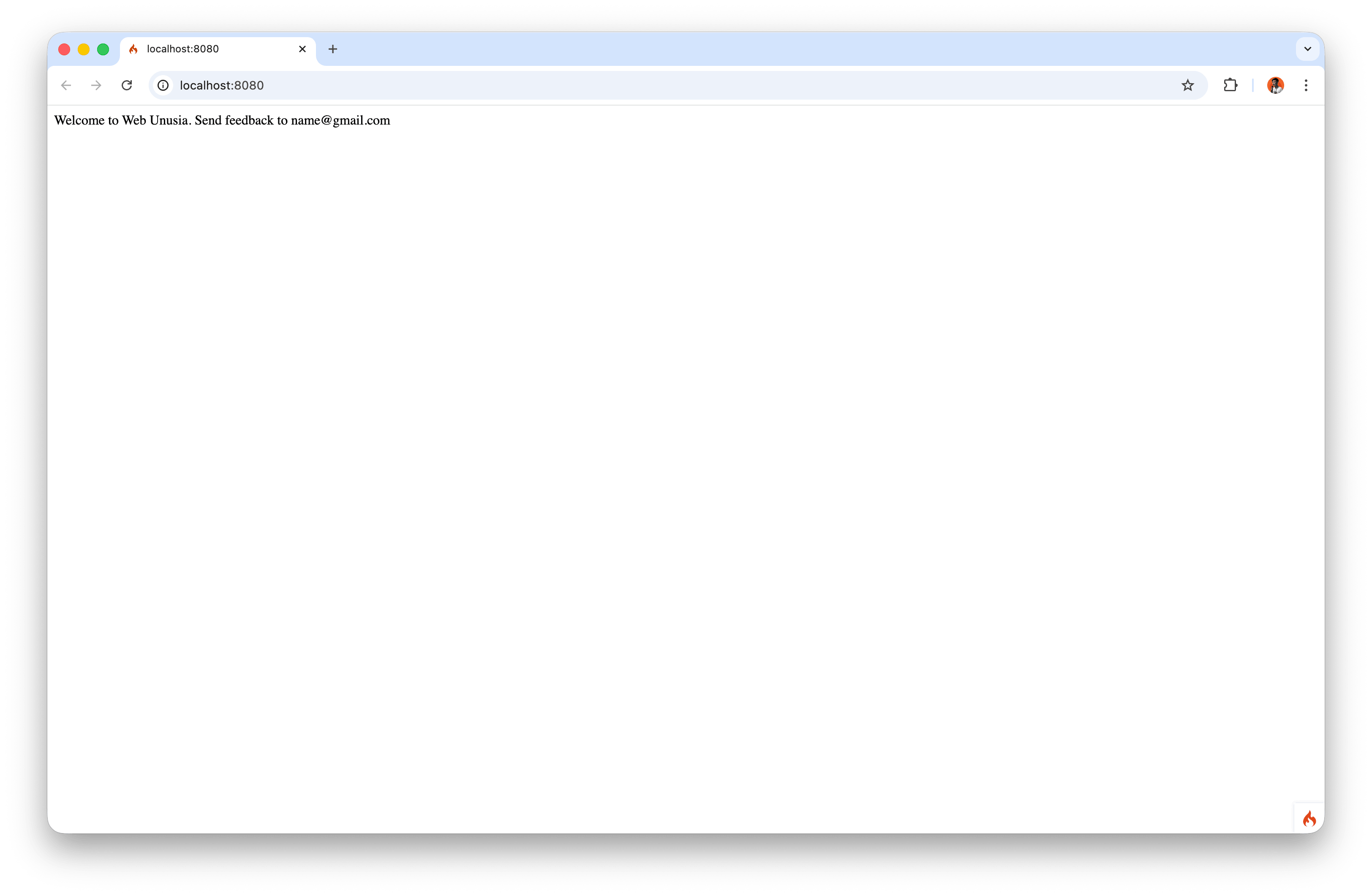
  echo "Welcome to {$config->siteName}. Send feedback to {$config->siteEmail}";
}
Next, reload the home page (localhost:8080) to see the changes.
2. Environment Variables (.env)
CodeIgniter 4 uses the .env file to manage configuration for different environments (development, testing, and production).
Main advantages:
- Sensitive values (such as DB passwords) are not hardcoded in source code.
- Easy to switch between environments without modifying many files.
- Safer and more practical for deployment.
Example database configuration in .env:
database.default.hostname = localhost
database.default.database = ci4
database.default.username = root
database.default.password = root
If you are using Windows, the password is often empty by default. If you use a custom password, adjust the value accordingly.
3. Command Line with php spark
The CodeIgniter CLI helps automate many development tasks.
Important commands:
php spark
php spark help migrate
With help, you can see:
UsageDescriptionOptions
4. Migration: Managing Table Structure
Migration helps manage database schema changes in a structured and consistent way across environments.
Create a migration:
php spark make:migration create_tasks_table
Example up() and down() methods:
public function up()
{
  $this->forge->addField([
    'id' => [
      'type'           => 'INT',
      'constraint'     => 5,
      'unsigned'       => true,
      'auto_increment' => true,
    ],
    'name' => [
      'type'       => 'VARCHAR',
      'constraint' => '100',
    ],
    'description' => [
      'type' => 'TEXT',
      'null' => true,
    ],
    'done' => [
      'type'    => 'TINYINT',
      'default' => false,
    ],
  ]);

  $this->forge->addKey('id', true);
  $this->forge->createTable('tasks');
}

public function down()
{
  $this->forge->dropTable('tasks');
}
Run migration:
php spark migrate
If a MySQL connection error appears, make sure:
.envconfiguration is correct,- host is correct (
localhostor127.0.0.1), - MySQL service is running.
5. Seeder: Inserting Initial/Dummy Data
Seeder is used to insert initial data automatically.
Create a seeder:
php spark make:seeder TaskSeeder
Example run() content:
public function run()
{
  $this->db->table('tasks')->insert([
    'name'        => 'Learn CodeIgniter',
    'description' => 'CI is a PHP framework that uses the MVC pattern.',
    'done'        => false,
  ]);
}
Run the seeder:
php spark db:seed TaskSeeder
6. Database Configuration
The main database configuration is in app/Config/Database.php. However, the recommended practice is to keep connection values in .env for better flexibility.
Important points:
$defaultGroupdefines the default connection group.- You can add another group, such as
production. - During testing, configuration can automatically use the
testsgroup.
7. Routing
Routing maps URIs to controller methods. The main routing configuration is in app/Config/Routes.php.
Example manual route:
$routes->get('task', 'TaskController::index');
In modern CI4, auto routing is not recommended for security reasons. Therefore, manual routing is preferred.
8. Library and Helper
CodeIgniter provides ready-to-use utilities:
Library: more complex features (for example session management).Helper: lightweight helper functions (for example URL, text, form).
Example URL helper usage in CI4:
helper('url');
echo base_url('assets/css/style.css');
Create a custom helper:
php spark make:helper MyHelper
Example helper function:
if (! function_exists('say_hello')) {
  function say_hello(string $name): string
  {
    return "Hello, {$name}! Welcome to CodeIgniter!";
  }
}
9. MVC Pattern in CodeIgniter 4
MVC separates an application into three components:
Model: manages data and database-related logic.View: renders the user interface.Controller: handles requests, processes flow, and connects model and view.
A. Model
Create a model:
php spark make:model TaskModel
Complete example of app/Models/TaskModel.php:
<?php

namespace App\Models;

use CodeIgniter\Model;

class TaskModel extends Model
{
  protected $table            = 'tasks';
  protected $primaryKey       = 'id';
  protected $useAutoIncrement = true;
  protected $returnType       = 'array';
  protected $useSoftDeletes   = false;
  protected $protectFields    = true;
  protected $allowedFields    = ['name', 'description', 'done'];
}
At this stage, the model is used to read data from migration and seeder results using methods such as findAll().
B. Controller
Create a controller:
php spark make:controller TaskController
Complete example of app/Controllers/TaskController.php:
<?php

namespace App\Controllers;

use App\Controllers\BaseController;
use CodeIgniter\HTTP\ResponseInterface;
use App\Models\TaskModel;

class TaskController extends BaseController
{
  public function index()
  {
    $taskModel = new TaskModel();
    $tasks = $taskModel->orderBy('id', 'DESC')->findAll();

    return view('v_task', [
      'title' => 'Task List',
      'tasks' => $tasks,
    ]);
  }
}
Add a route so the method can be accessed:
$routes->get('task', 'TaskController::index');
C. View
The view structure used in this stage:
app/Views/
  v_task.php
Complete example of app/Views/v_task.php:
<!DOCTYPE html>
<html lang="en">
<head>
  <meta charset="UTF-8">
  <meta name="viewport" content="width=device-width, initial-scale=1.0">
  <title><?= esc($title) ?></title>
</head>
<body>
<h1><?= esc($title) ?></h1>

<p>The following data comes from the <code>tasks</code> table created through migration and filled using seeder.</p>

<?php if (empty($tasks)): ?>
  <p>No tasks found yet.</p>
<?php else: ?>
  <ul>
    <?php foreach ($tasks as $task): ?>
      <li>
        <strong><?= esc($task['name']) ?></strong>
        <?php if (! empty($task['description'])): ?>
          - <?= esc($task['description']) ?>
        <?php endif; ?>
      </li>
    <?php endforeach; ?>
  </ul>
<?php endif; ?>

</body>
</html>
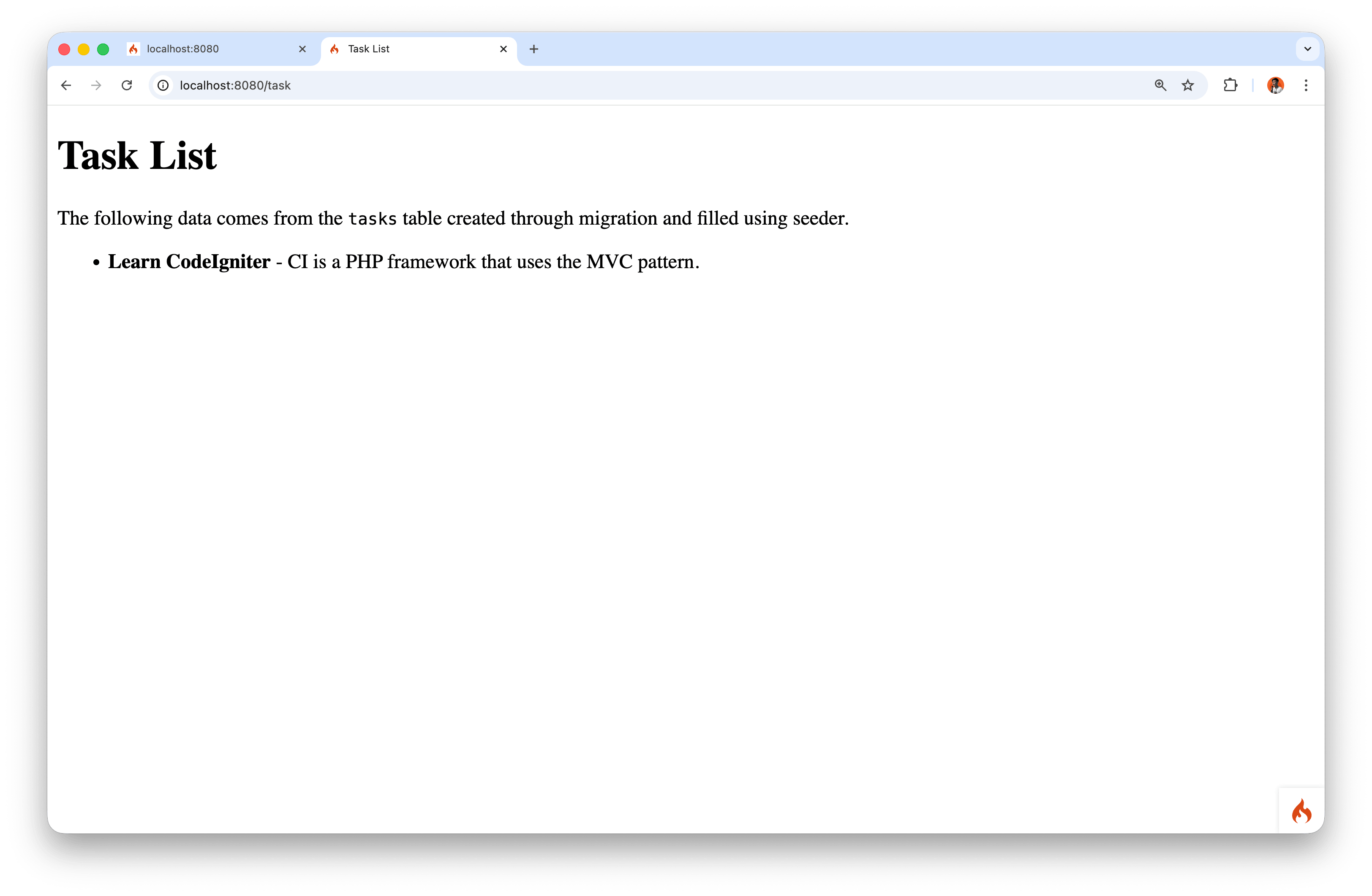
At this stage, we focus on one simple view first. Layout concepts will be discussed in the next module.
10. Summary
This chapter highlights essential foundations of web development with CodeIgniter 4:
- Application and environment configuration.
- CLI usage for better productivity.
- Database management through migration and seeder.
- Secure and structured route configuration.
- MVC implementation for modular applications.
By mastering this part, development becomes more systematic, easier to test, and more ready for larger-scale applications.