Django: Hello World Website
Published:
This chapter introduces how the internet and web frameworks work, then moves into Django architecture. After that, we build a “Hello, World” website from scratch using a URL dispatcher and views, and close with basic Git practices for version control.
In this chapter, we will learn:
- How the internet works at a high level (domain, DNS, IP, HTTP request/response).
- How web frameworks power dynamic websites.
- Django core architecture components: URL, view, model, and template.
- The difference between MVC and Django’s MVT/MVTU approach.
- Steps to create a Django project and its first app.
- How to implement a static “Hello, World!” page.
- Basic Git usage:
git init,.gitignore,requirements.txt, and an initial commit.
1. How the Internet Works
When a user types an address such as https://learndjango.com, the browser performs a sequence of network operations before the page appears.
In simple terms, the flow is:
- The user enters a domain name in the browser.
- The browser asks DNS to translate the domain into an IP address.
- The browser opens a network connection to the destination server.
- The browser sends an HTTP request for the required resource.
- The server processes the request and returns an HTTP response.
- The browser renders the webpage.
HTTP (Hypertext Transfer Protocol) is the main communication rule set used across the web. After a request is received and a response is returned, the browser renders HTML and fetches additional assets through the same request/response cycle.
2. How Web Frameworks Work
Websites are generally divided into two types:
- static: each page is a separate HTML file
- dynamic: pages are generated from templates, data, and application logic
Django is designed for dynamic websites. With frameworks like Django, developers do not need to build every web component manually. Repetitive tasks are standardized to make development safer, more consistent, and easier to maintain.
At a core level, a web framework handles three things:
- Mapping URLs to view logic.
- Providing abstraction layers for database interactions.
- Rendering output through a templating system.
3. Django Architecture
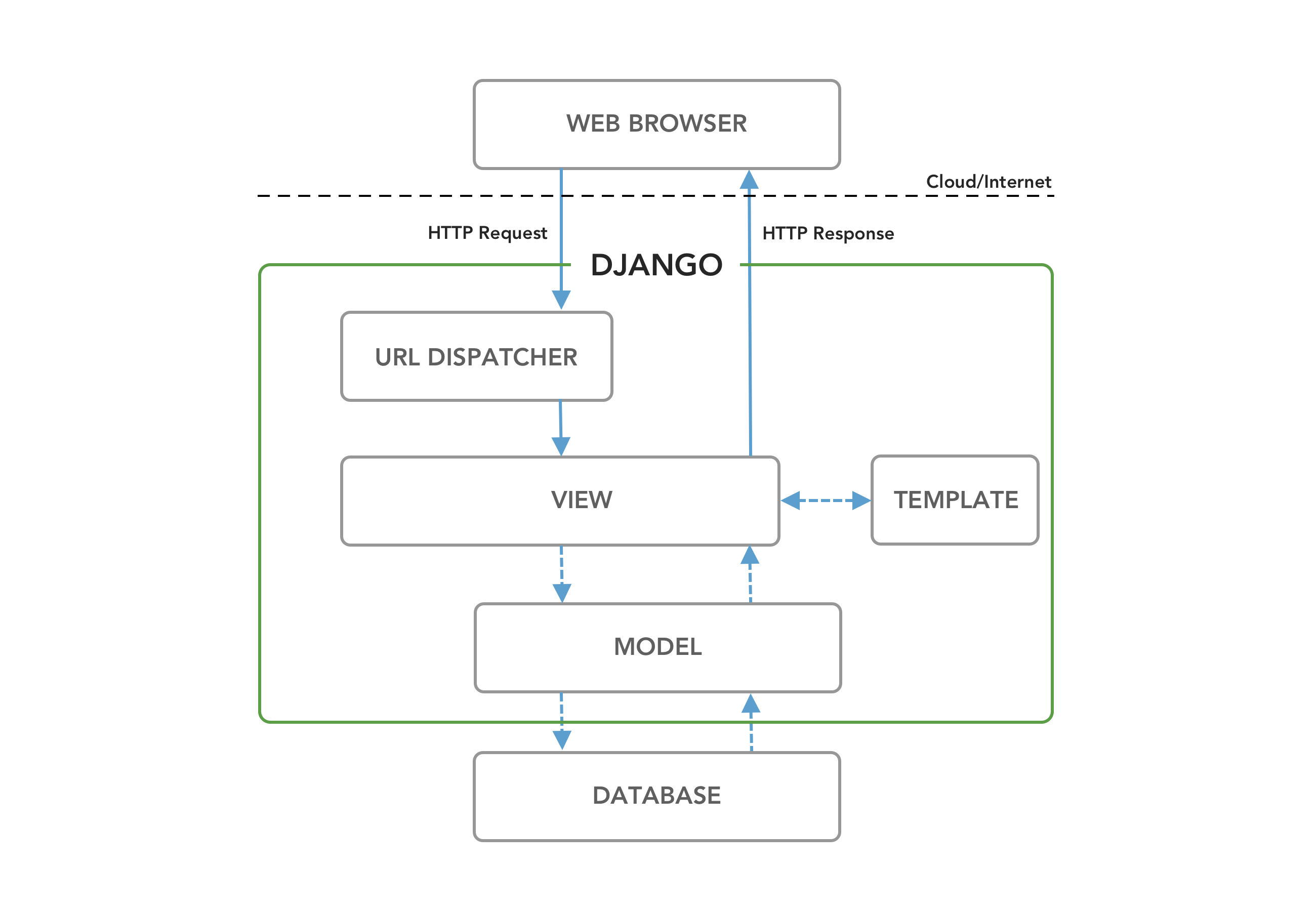
The four primary Django components are:
- URL configuration
- View
- Model
- Template
The request/response cycle works like this:
- An HTTP request arrives from the browser.
urls.pymatches the URL to the proper view.views.pyprocesses the request.- If data is needed, the view interacts with
models.py. - If HTML output is needed, the view passes data to a template.
- The view returns an HTTP response to the browser.
For simple cases like this chapter, an app can run with only a URL dispatcher and a view.
4. MVC vs MVT in Django
Many frameworks use the MVC pattern:
- Model: manages data and business logic
- View: presents data
- Controller: receives input and controls application flow
In Django, the common pattern is called MVT (or more precisely MVTU):
- Model: manages data and business logic
- View: decides which data is sent
- Template: presents data to users
- URL Configuration: maps routes to views
Conceptually:
- MVC “View” is similar to Django “Template”
- MVC “Controller” is split into Django URL dispatcher and view
5. Initial Setup for the Hello, World Project
5.1 Create the working directory
# Windows
cd onedrive\desktop\pawf\django
mkdir project2
cd project2

# macOS
cd ~/desktop/pawf/django
mkdir project2
cd project2
5.2 Create a virtual environment and install dependencies
# Windows
python -m venv .venv
.venv\Scripts\Activate.ps1
python -m pip install Django==6.0.4
python -m pip install black

# macOS
python3 -m venv .venv
source .venv/bin/activate
python3 -m pip install Django==6.0.4
python3 -m pip install black
5.3 Create a Django project
django-admin startproject django_project .
Initial structure:
django_project/
├── __init__.py
├── asgi.py
├── settings.py
├── urls.py
└── wsgi.py
manage.py
6. Running the Server and Migrations
Run the development server:
python manage.py runserver
You will usually see a warning about unapplied migrations. Stop the server (Control+C) and run:
python manage.py migrate
This applies built-in migrations (admin, auth, contenttypes, sessions) to the local SQLite database. After that, run the server again and the migration warning should disappear.
When the server runs for the first time, db.sqlite3 will be created in the project root.
7. Creating a New App
Create an app named pages:
python manage.py startapp pages
Basic app structure:
pages/
├── __init__.py
├── admin.py
├── apps.py
├── models.py
├── tests.py
└── views.py
Directory structure after creating the app:
project2/
├── .venv/
├── db.sqlite3
├── manage.py
├── django_project/
│   ├── __init__.py
│   ├── asgi.py
│   ├── settings.py
│   ├── urls.py
│   └── wsgi.py
└── pages/
    ├── migrations/
    ├── __init__.py
    ├── admin.py
    ├── apps.py
    ├── models.py
    ├── tests.py
    ├── urls.py # new
    └── views.py # new
Register the app in INSTALLED_APPS inside django_project/settings.py:
INSTALLED_APPS = [
    "django.contrib.admin",
    "django.contrib.auth",
    "django.contrib.contenttypes",
    "django.contrib.sessions",
    "django.contrib.messages",
    "django.contrib.staticfiles",
    "pages",  # new
]
8. Creating the First View
Update pages/views.py:
from django.http import HttpResponse


def home_page_view(request):
    return HttpResponse("Hello, World!")
In short, every view receives a request object and returns a response.
9. URL Dispatcher
Create pages/urls.py:
from django.urls import path
from .views import home_page_view

urlpatterns = [
    path("", home_page_view),
]
Then update django_project/urls.py so the pages app is connected:
from django.contrib import admin
from django.urls import include, path

urlpatterns = [
    path("admin/", admin.site.urls),
    path("", include("pages.urls")),
]
Restart the server:
python manage.py runserver
When you open http://127.0.0.1:8000/, it should display Hello, World!.

Directory structure after creating the app:
10. Git Basics for a Django Project
Initialize the repository:
git init
git status
Create .gitignore and add:
.venv/
Save installed package versions:
pip freeze > requirements.txt
Sample output:
asgiref==3.11.1
black==26.5.2
click==8.4.1
Django==6.0.4
mypy-extensions==1.0.0
packaging==26.2
pathspec==1.1.1
platformdirs==4.9.6
sqlparse==0.5.5
Create the initial commit:
git add .
git commit -m "initial commit"
11. Summary
This chapter establishes key foundations before building more complex Django applications:
- Understanding internet flow and HTTP request/response.
- Understanding Django core architecture (URL, view, model, template).
- Building the first “Hello, World” website.
- Learning Django app setup and routing.
- Applying basic Git and dependency management practices.
In the next chapter, we will continue with templates, richer view patterns, and testing.
References
Django for Beginners by William S. Vincent